


[Jan-2022] C-THR92-2105 Dumps Full Questions - SAP Certified Application Associate Exam Study Guide
Exam Questions and Answers for C-THR92-2105 Study Guide
SAP C-THR92-2105 Exam Description:
The "SAP Certified Application Associate - SAP SuccessFactors People Analytics: Reporting 1H/2021" certification exam verifies that the candidate possesses the basic knowledge in the area of the SAP SuccessFactors People Analytics: Reporting solution. This certificate proves that the candidate has a basic and overall understanding within this consultant profile of the industry solution, and can implement this knowledge practically in projects under guidance of an experienced consultant. It is recommended as an entry-level qualification to allow consultants to get acquainted with the fundamentals of SAP SuccessFactors People Analytics: Reporting.
NEW QUESTION 46
You are using a pivot table in your canvas report but the report does NOT display the most recent data.
Whatcould be the reason?
- A. You are using a wrong People Scope.
- B. You are using the percent of total option.
- C. You are NOT using a template.
- D. You are using a query with a static date filter.
Answer: D
NEW QUESTION 47
You have created a custom MDF object to track company car information. You need to be able to create story reports on the data of the custom MDF object.
What must you do to enable a custom MDF object to belisted in the Available Data section of Query Designer?
- A. Create a Report Schema Configuration Entity Record.
- B. Update the Report Object Configuration Entity record for the object and set it as a root report object.
- C. Update the Report Object Configuration Entity record for the object and associate the object with a schema.
- D. Create a custom schema join usingthe Report Schema Join Manager tool.
Answer: B
NEW QUESTION 48
Which of the following would make it possiblefor a filter to update multiple charts using linked analysis?
Note: There are 2 correct answers to this question.
- A. The data sources for the charts should contain linked dimensions.
- B. The charts should usethe same measures.
- C. The chart should use the same aggregation.
- D. The charts should have the same data source.
Answer: A,B
NEW QUESTION 49
When you create a table report, in which step can you include inactive users?
- A. People
- B. General
- C. Filters
- D. Columns
Answer: A
NEW QUESTION 50
A report shows one row for each language an employee speaks. The employee information "First name" and "Last name" is repeated for each language on each row.
Which format option allows you to display the employee information "First name" and "Last name" only once for each employee?
- A. Show Total Row
- B. Sum Function
- C. Group Columns
- D. Column Style Settings
Answer: C
NEW QUESTION 51
Whichare valid destinations of a scheduled Report Distributor bundle?
Note: There are 3 correct answers to this question.
- A. Run Offline
- B. Notification
- C. E-Mail
- D. Home Page
- E. FTP
Answer: A,C,E
NEW QUESTION 52
You want to create a query that shows only the current Job Information data for each employee.
On the Job Information table, which date type configurations can you use?
Note: There are 2 correct answers to this question.
- A. Current Date
- B. Show All
- C. As of Date with a dynamic date value of Today
- D. Date Range (On Start Date) with a date range from Today to Today
Answer: A,D
NEW QUESTION 53
Which permissions should you assign to allow a user to add a new story that will include Career Development Planning data?
Note: There are 2 correct answers to this question.
- A. Report Permission -> Create Report - Story
- B. Report Permission -> Create Report
- C. Career Development Planning -> Data Access: Report - Story
- D. Career Development Planning -> Career Development Plan (CDP) Access Permission
Answer: A,C
NEW QUESTION 54
Whatis included in the saved state of a bookmark for a Story report?
Note: There are 3 correct answers to this question.
- A. Input controls
- B. Data
- C. Comments
- D. Filters
- E. Prompts
Answer: A,D,E
NEW QUESTION 55
What is the purpose of the Include Starting From User setting in People Scope?
- A. To include a range of users
- B. To include users the report is shared with
- C. To include the user column as the first column
- D. To include the results for the user the report is running for
Answer: B
NEW QUESTION 56
User A schedules a report in Report Center Scheduler.
What can user A achieve by enabling the Job Completion notification option for a scheduled job in the Report Center Scheduler?
- A. A notification appears for user A on the home page after the report distribution process is complete.
- B. An e-mail is sent to the recipient of the report that the report distribution process is complete with the report.
- C. A notification appears for the recipient of the report on the home page after the report distribution process is complete.
- D. An e-mail is sent to user A after the report distribution process is complete.
Answer: D
NEW QUESTION 57
You want to join two tables, A and B, and you want to include all rows from Table A, and only matching rows from Table B.
Which join type must you use?
- A. Left
- B. Outer
- C. Inner
Answer: A
NEW QUESTION 58
A table report is shared with a user. That user CANNOT see the table report in the Report Center list.
Which role-based permission has NOT been set correctly for this user?
- A. Create Report access to the domain
- B. Run Report access to the domain
- C. Access to Insights
- D. Ability to manage Tiles and Dashboards
Answer: D
NEW QUESTION 59
An executive reviews a canvas report on employee compensation. The executive discovers that NOT all employees are included in the report. You need to adjust the report so thatall employees are included by default, but included employees can be adjusted at runtime.
How do you accomplish this task?
Note: There are 2 correct answers to this question.
- A. Set the People Scope Team Manager to CEO and set Team Reporting Type to Team View.
- B. Set a run-time filter on User Sys ID.
- C. Set the People Scope Team Manager to Logged in User and set Team Reporting Type to other filters.
- D. Enable User Prompted People Scope.
Answer: C,D
NEW QUESTION 60
You want to create a report that returns only employees who were born in 1961. You also want to enable the person who runs the report to specify a different birth year.
How can you achieve this?
Note: There are 2 correct answers to this question.
- A. 1. Select Date Options from the Toolbar.
2. Set Date Type to As of Date.
3. Set As of Date to 1/1/1961.
4. Set Use Custom Columns.
5. Select Date of Birth from Start Date Column.
6. Select Date of Birth from End Date Column.
7. Set Selectable At Runtime. - B. 1. Select Date Options from the Toolbar.
2. Set Date Type to Show All.
3. Select Manage Run Time Filters from the Toolbar.
4. Expand Personal Information table.
5. Select Date of Birth column.
6. Select OK. - C. 1. Select Date Options from the Toolbar.
2. Set Date Type to Date Range (On Start Date).
3. Set From date to 1/1/1961 and To date to 12/31/1961.
4. Set Use Custom Columns.
5. Select Date of Birth from Start Date Column.
6. Set Selectable At Runtime. - D. 1. Select Manage Query Filters.
2. Expand Personal Information table and select Date of Birth.
3. Select Greater than or equal to from the operator list.
4. Set Custom filter date to 1/1/1961.
5. Select OK and then select Add.
6. Expand Personal Information table and select Date of Birth.
7. Select less than or equal to from the operator list.
Answer: C,D
Explanation:
8. Set Custom filter date to 12/31/1961.
9. Select OK.
NEW QUESTION 61
Youwant to build a query for a cross-domain report.
What does the system do with fields that are NOT available for this report?
- A. Unavailable fields are hidden.
- B. Unavailable fields are marked gray.
- C. Unavailable fields are moved to the bottom of the list.
- D. Unavailable fields are markedred.
Answer: A
NEW QUESTION 62
Where can you obtain the latest versions of the standard report templates provided by SAP Success Factors?
- A. SAP Help Portal
- B. SAP PartnerEdge
- C. SAP Support Portal
- D. SuccessFactors HCM Cloud Operations Portal
Answer: A
NEW QUESTION 63
How do you configure the Builder to display the table in the screenshot in a story report? Note: There are 3 correct answers to this question. Headcount by Location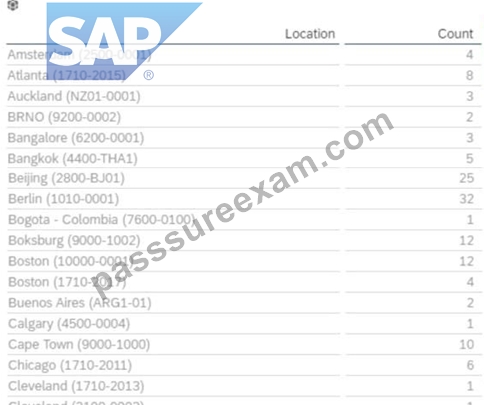
- A. Column: Count
- B. Row: Count
- C. Table Structure: Aggregated List
- D. Table Structure: Cross-tab
Answer: A,B,D
NEW QUESTION 64
When you share a canvas report, from where can the user access that report?
Note: There are 2 correct answers to this question.
- A. Reporting Menu
- B. Metrics Panel
- C. Home Page
- D. Report Center
Answer: A,D
NEW QUESTION 65
You are creating a Story report on Job Classifications. You have configured the chart, table, and input control on the canvas as displayed in the screenshot.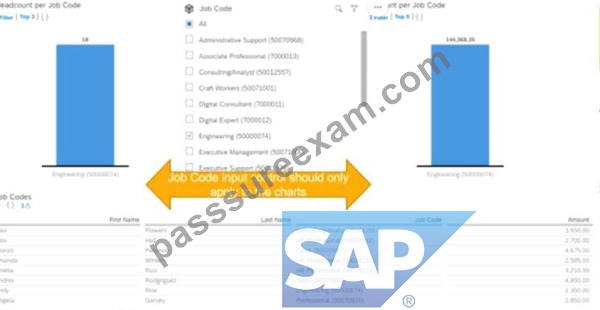
How do you set the input control?
- A. Convert it to a Story Filter.
- B. Enable Cascading Effects.
- C. Create the corresponding filter on each chart.
- D. Configure it for Linked Analysis.
Answer: C
NEW QUESTION 66
You are configuring a story report. You add the image widget to the top-left corner of the canvas. You then upload the SuccessFactors logo in the Builder and select the logo image so it displays on the canvas. When you preview the report in View Mode, the logo appears centered on the canvas.
What action do you take so the Logo appears in the top-left corner when viewing the report in view mode?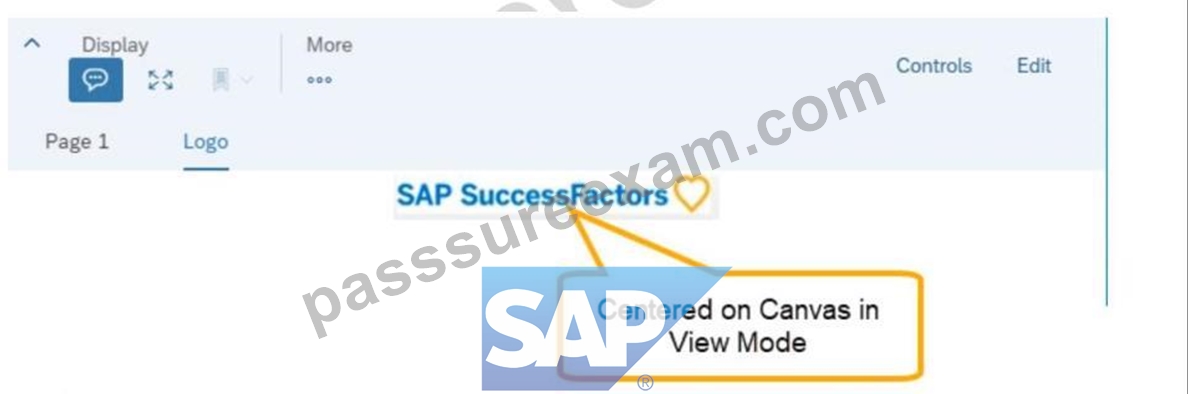
- A. In Builder for the image, set the imageto Dynamic.
- B. In Styling for the image, set the Image Properties to Pan.
- C. In Designer Mode, add another widget under the image.
- D. In Styling for the page, set the Page Size to Fixed.
Answer: C
NEW QUESTION 67
The data source used by the two tables only displays current (active) employees.
How would you configure a filter on the table End of Previous Year Headcount by Location to display data accurately?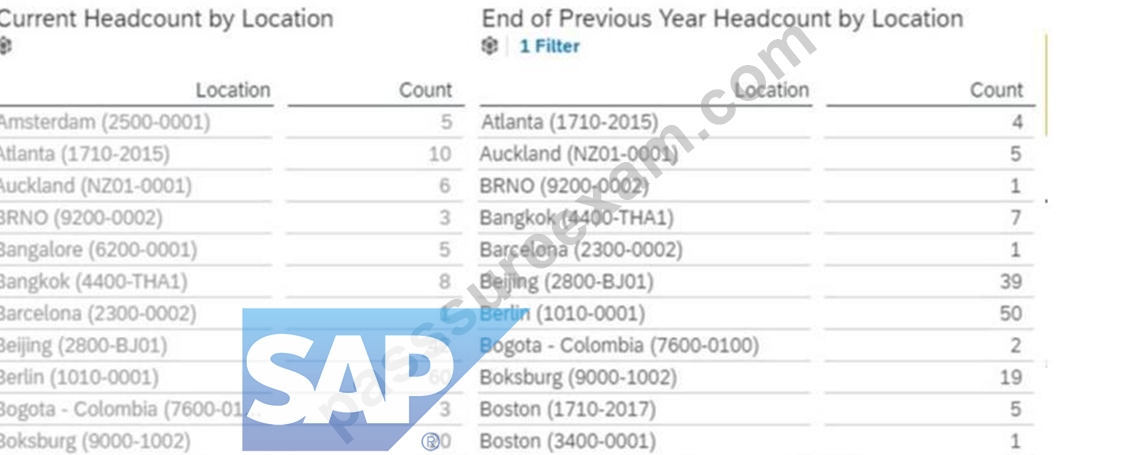
Note: There are 2 correct answers to this question.
- A. Set a filter on Hire Date (Range)
- B. Set the Range type to Standard
- C. Set the Range type to Offset
- D. Set a filter on Hire Date (Member)
Answer: A,C
NEW QUESTION 68
User A maintains a canvas report of employee contact information. User A leaves the company. Another report designer, user B, is assigned the responsibility to maintain the report, but currently CANNOT modify the report.
How do you allow user B to modify only this report?
- A. Update the reports' sharing toinclude user B.
- B. Edit authorship of the report.
- C. Assign User B the permission Access All Reports.
- D. Edit user B's WFA Role configuration.
Answer: A
NEW QUESTION 69
You are configuring a story report. You add the image widget to the top-left corner of the canvas. You then upload the SuccessFactors logo in the Builder and select the logo image so it displays on the canvas. When you preview the report in View Mode, the logo appears centered on the canvas.
What action do you take so the Logo appears in the top-left corner when viewing the report in view mode?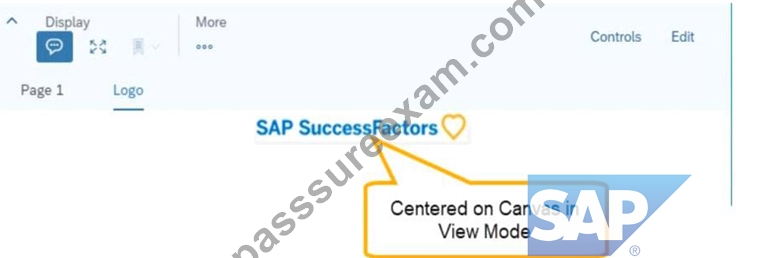
- A. In Builder for the image, set the image to Dynamic.
- B. In Styling for the image, set the Image Properties to Pan.
- C. In Designer Mode, add another widget under the image.
- D. In Styling for the page, set the Page Size to Fixed.
Answer: C
NEW QUESTION 70
......
SAP C-THR92-2105 Exam Syllabus Topics:
| Topic | Details |
|---|---|
| Topic 1 |
|
| Topic 2 |
|
| Topic 3 |
|
SAP Certified Application Associate - SAP SuccessFactors People Analytics Embedded Edition 3H/2021 Free Update With 100% Exam Passing Guarantee: https://www.passsureexam.com/C-THR92-2105-pass4sure-exam-dumps.html